
How soon can you qualify for a Kentucky VA loan after a Chapter 7 or 13 Bankruptcy?
How Soon Can You Qualify for a VA Loan after a Chapter 7 or Chapter 13 Bankruptcy in Kentucky?

As a reminder, these are the basic differences between bankruptcies which impact VA qualifying differently:
- Chapter 7 Bankruptcy: you ask the bankruptcy court to discharge most of the debt you owe
- Chapter 13 Bankruptcy: you file a repayment plan with the bankruptcy court to pay back all or a portion of your debts over time.
So, does the type of bankruptcy filed affect VA loan qualifying? The answer is YES, it most definitely does.
How soon can you qualify for a VA loan after a Chapter 7 Bankruptcy?
- Chapter 7 Bankruptcies discharged more than two years ago from the date of closing for purchases and refinance, it may be disregarded.
- If the bankruptcy was discharged within the last 1 to 2 years, it is probably not possible to determine that the applicant or spouse is a satisfactory credit risk unless both of the following requirements are met:
- The applicant or spouse has obtained consumer items on credit subsequent to the bankruptcy and has satisfactorily made the payments over a continued period; and
- The bankruptcy was caused by circumstances beyond the control of the applicant or spouse such as unemployment, prolonged strikes, medical bills not covered by insurance, and so on, and the circumstances are verified. Divorce is not generally viewed as beyond the control of the borrower and/or spouse.

Please note that additional factors can contribute towards granting an exception to the 2 year policy, but any and all factors considered would have to be reviewed on a case by case scenario prior to approval. Borrowers discharged for less than a year will not generally be accepted as a satisfactory credit risk.
How soon can you qualify for a VA loan after a Chapter 13 Bankruptcy?
A. For Chapter 13 Bankruptcies that are still in progress:
- The applicant must document at least one year into the payout plan has elapsed along with satisfactory payment history
- The applicant must obtain court permission to enter into the new mortgage
- When the bankruptcy is still in repayment, the Chapter 13 payment will be counted in the debt ratios
B. Once the borrower has satisfactorily completed the repayment, the borrower is considered to have re-established credit
As you can see, the type of bankruptcy can drastically impact VA loan eligibility and the required waiting period.
If you have filed for chapter 7 or chapter 13 bankruptcy, then you can still qualify for a mortgage just one day out of bankruptcy. Today, there are thousands of people who are trying to find a mortgage after filing for bankruptcy. In the past, finding a mortgage after a bankruptcy was not the easiest thing to do. The good news is that today you can get a mortgage just one day out of bankruptcy.
How Long after a Bankruptcy Can I Qualify for a Mortgage?
There are bankruptcy lenders who can help with your mortgage even just one day out of chapter 7 or chapter 13 bankruptcy. You will likely need a larger down payment and show that you are taking steps to improve your credit.
Below, we will take you through some mortgage after bankruptcy options and then connect you with some of the best bankruptcy lenders. We understand that you area dealing with a lot and having a bankruptcy is not easy. Let us help guide you through this process.
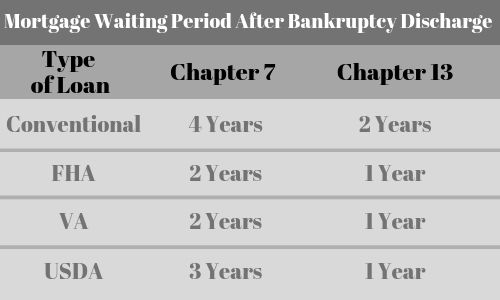
| Type of Loan | Chapter 7 | Chapter 13 |
| Conventional | 4 years | 2 years |
| FHA | 2 years | 1 year |
| VA | 2 years | 1 year |
| USDA | 3 years | 1 year |
| Subprime | 1 day | 1 day |
How Long Must You Wait To Qualify for a Mortgage After Filing for Bankruptcy
Every type of loan has different waiting period requirements. Here are some of the basics:
- VA Loans after bankruptcy– 2 year waiting period
- FHA Loans after bankruptcy – 2 year waiting period
- USDA Loans after bankruptcy – 3 year waiting period
- Conventional mortgages after bankruptcy – 4 year waiting period after chapter 7 and 2 years after chapter 13
y.
FHA Loan Requirements After a Bankruptcy
VA Loan Requirements After a Bankruptcy
- You will have a two year waiting period first after filing for bankruptcy
- You will need to meet the eligibility criteria as a veteran
- Zero down payment
- No PMI required for a VA loan
- You must meet the minimum income requirements
- You will have to pay the VA funding fee which can also be borrowed.
USDA Loan Requirements After a Bankruptcy
- You will have to wait three years after filing for bankruptcy
- Must be a citizen of the US or be an eligible non-citizen
- Must be legally able to borrow (ie, must meet the age limits)
- Must occupy the home as your primary residence
- Must currently be without safe and sanitary housing now
- Must not have the current ability to obtain a conventional loan from other sources and lenders
- May not be barred from participating in any federal loan programs.
- Must meet the income limits set by the program
 KENTUCKY VA MORTGAGE LENDER
You must be logged in to post a comment.